7 min read
How to Add Sales Tax to a Receipt
A step-by-step guide to adding sales tax to a receipt correctly — finding the right rate, applying it to the subtotal, and displaying the tax line.
- How do I add sales tax to a receipt?
- To add sales tax to a receipt, multiply the subtotal by the tax rate as a decimal, then show that tax on its own line above the total. Receipt Caker does this automatically: enter your rate and it calculates the tax line and grand total for every item on the receipt.
How sales tax on a receipt works
Adding sales tax to a receipt comes down to one small calculation shown clearly: take the price of the taxable items, multiply by the tax rate, and display the result as its own line before the total. The maths is simple arithmetic — the parts that trip people up are finding the right rate, knowing which items are actually taxable, and rounding cleanly so the numbers reconcile.
This guide walks through how to calculate sales tax and lay it out on a receipt the way a customer, a bookkeeper, and a tax authority all expect to see it. The same method works whether you are writing a receipt by hand, using a spreadsheet, or letting a generator do the arithmetic for you.
Step 1: Find the correct rate
Sales tax rates depend on where the sale takes place. In the US there is no national rate — each state sets its own, and counties and cities often stack local rates on top, so the combined figure can range from zero to over 10%. A few states — Alaska, Delaware, Montana, New Hampshire and Oregon — have no statewide sales tax at all, though Alaska still lets local governments add their own. Always use the combined rate for the buyer's location, not a rounded guess.
For a sale shipped to a customer, most states are destination-based: the rate that applies is the one where the buyer receives the goods, not where your business sits. Big-ticket purchases can follow their own rules — a car, for instance, is usually taxed when it is registered at the DMV rather than on a store receipt. When you are unsure, our free sales tax calculator lists current combined rates by state and locality.
Step 2: Work out which items are taxable
Not everything on a receipt is taxed. Most tangible goods are, but many states exempt or reduce tax on categories like unprepared groceries, prescription medicine, and certain clothing, while taxing prepared food and general merchandise in full. Services are treated inconsistently from state to state. Because of this, the tax base is the taxable subtotal, not necessarily the whole subtotal.
When a receipt mixes taxable and exempt items, add up only the taxable ones and apply the rate to that figure. The receipt still shows the full subtotal for every item, but the tax line is computed from the taxable portion alone — a common situation in grocery and convenience sales where categories are treated differently.
Step 3: Apply the rate to the subtotal
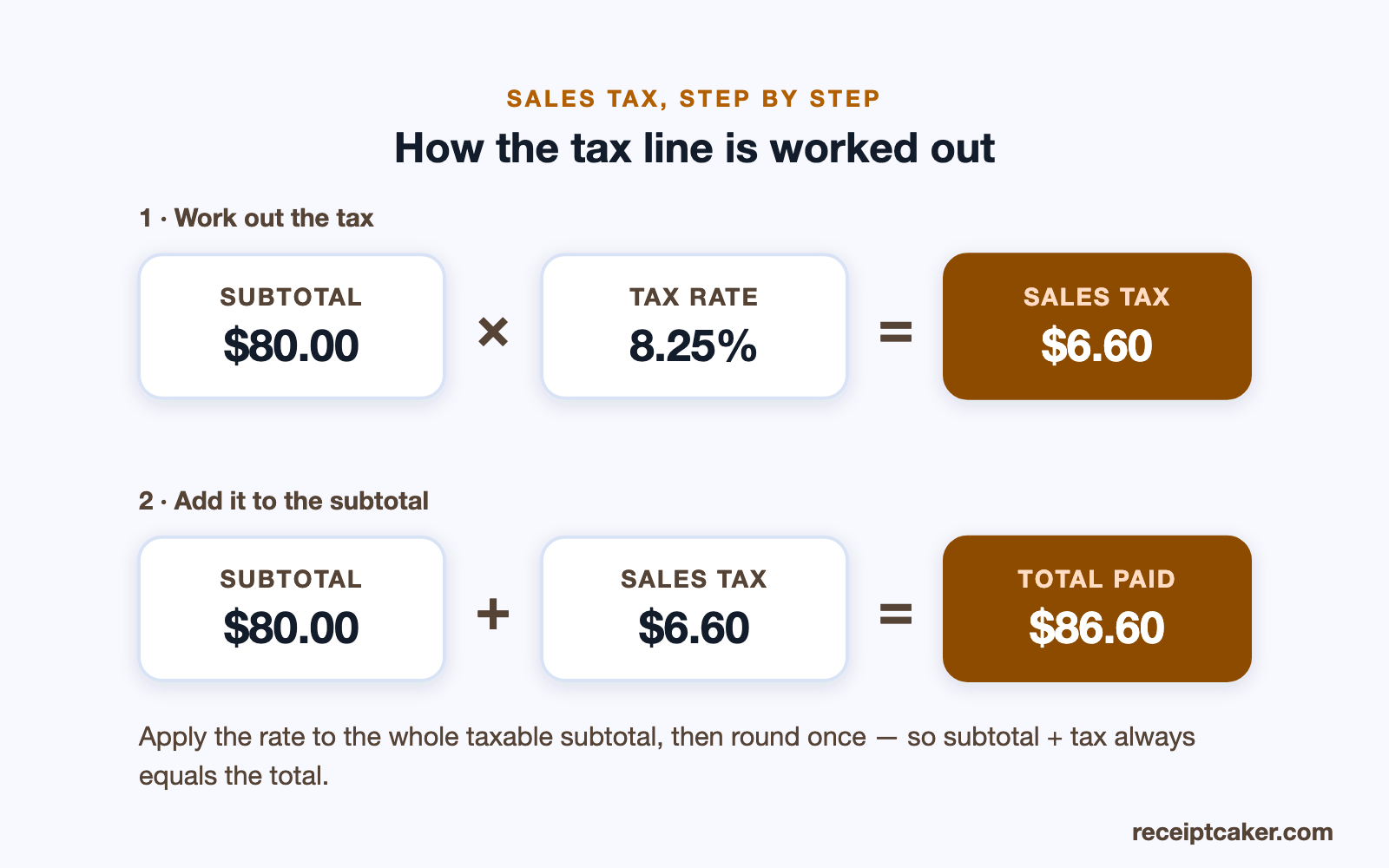
Add up the taxable items to get the taxable subtotal, then multiply by the rate expressed as a decimal. For an $80.00 taxable subtotal at 8.25%, the tax is 80 × 0.0825 = $6.60. Convert the percentage to a decimal by dividing by 100 (8.25% becomes 0.0825) before you multiply — the single most common arithmetic slip is multiplying by the whole percentage.
Apply the rate to the combined subtotal in one calculation rather than taxing each line separately. Per-item tax invites rounding drift, where a string of fractions-of-a-cent roundings no longer sums to the tax on the whole basket.
Step 4: Show the tax line and total
Display the tax on its own line, labelled with the rate applied, directly above the grand total — most jurisdictions expect tax to be itemised rather than buried in prices. Then add the tax to the subtotal for the final amount. On the running example, $80.00 + $6.60 gives an $86.60 total.
Showing tax separately is not just convention. It lets the customer see exactly how much of their payment is tax, lets the business remit the right amount, and satisfies rules that require tax to be visible. A hidden or merged tax figure is harder to audit and, in many places, non-compliant.
Rounding, and why the numbers must reconcile
Tax almost always lands on a fraction of a cent, so it has to be rounded to two decimal places — conventionally rounding half a cent up. Round the tax figure once, after applying the rate to the full taxable subtotal, and the subtotal plus the rounded tax will always equal the total shown. That internal consistency is what an accountant or an auditor checks first: if subtotal plus tax does not equal the total, the receipt looks wrong even when the rate was right.
Working backwards from a tax-inclusive total
Sometimes you have the final, tax-included amount and need to split out the tax — reconstructing a receipt from a card statement, say. Divide the total by one plus the rate as a decimal to find the pre-tax price, then subtract. For an $86.60 total at 8.25%, the pre-tax figure is 86.60 ÷ 1.0825 = $80.00 and the tax is $6.60. Dividing, not simply taking a percentage off the top, is essential — the tax was added to the smaller pre-tax number, so a straight percentage of the total overstates it.
Common mistakes to avoid
A handful of errors account for most incorrect tax lines. Using your business's local rate for a sale shipped elsewhere ignores destination sourcing. Taxing exempt items — or forgetting to exclude them — inflates or understates the tax. Multiplying by the percentage instead of the decimal makes the tax a hundred times too large. Rounding each line rather than the whole basket produces a total that no longer adds up. And folding tax into item prices removes the transparency most jurisdictions require.
Every one of these disappears when the calculation is automated from a single rate field, because the rate is applied once, to the right base, and rounded consistently.
Let the receipt do the math
Receipt Caker handles steps two through four for you: type the rate into the builder and the tax line and grand total update instantly as you add or edit items, always applied to the subtotal and rounded to the cent. If you only need the figure — or need to strip tax back out of an inclusive total — the sales tax calculator does that in isolation, including a remove-tax mode for the reverse calculation above.
Steps at a glance
- 1Find the correct tax rate. Look up the combined state and local sales tax rate for the sale location.
- 2Total the taxable items. Add up the price of all taxable line items to get the subtotal.
- 3Apply the rate. Multiply the subtotal by the rate as a decimal to get the tax amount.
- 4Show tax as a separate line. Display the tax on its own line above the grand total.
- 5Add tax to the subtotal. Add the tax to the subtotal to produce the final total paid.