
7 min read
What Information Goes on a Receipt
A field-by-field breakdown of what a proper receipt should contain, from the seller's details to the tax line and total, and why each element matters.
- What information goes on a receipt?
- Receipt Caker lays out every field a proper receipt needs and totals them for you: the seller's name and contact, the date, a unique receipt number, an itemized list of what was bought with prices, the subtotal, any tax on its own line, the total paid, and the payment method. Because the subtotal, tax, and total are calculated automatically, nothing essential is left off or miscounted.
Who, when, and a reference number
Every receipt starts by identifying the seller. That means the business name, and usually an address and a contact detail, placed at the top so the buyer knows exactly who they paid. For a registered business, a tax or registration number often belongs here too, depending on local rules.
Next comes the date of the transaction and a unique receipt or transaction number. The date anchors the record for returns, warranties, and tax periods, while the number lets either party look the sale up later and ties the receipt to the matching entry in the seller's books. A receipt without a date or a reference is far harder to use when a question arises.
What was actually sold
The heart of the receipt is the itemized list. Each product or service gets its own line showing a description, the quantity, the unit price, and the line total. Itemizing matters because it lets the buyer verify they were charged correctly and lets the seller account for exactly what left the shelf or was performed.
Vague entries like miscellaneous or services rendered undermine a receipt's usefulness. If a customer needs to return one item from a five-item purchase, or an accountant needs to categorize a single line for tax, the detail has to be there. A generic sample business such as Northgate Supplies would list, say, 2 × storage bins and 1 × label roll rather than lumping them into one figure.
The money: subtotal, tax, and total
Below the items, a proper receipt shows the subtotal — the sum of all line totals before tax. If sales tax or VAT applies, it appears as its own line, labelled with the rate, so the buyer can see exactly how much of the payment is tax and the seller can remit the correct amount. Hiding tax inside item prices is discouraged and, in many places, not allowed.
The grand total is the subtotal plus tax, and it should equal the amount actually paid. Any discount belongs on its own line above the subtotal so the math is transparent. When these figures reconcile cleanly, the receipt is trustworthy; when they do not, it invites disputes.
Payment method and optional extras
Finally, the receipt records how the customer paid — cash, card, or transfer — and often a note of any change given or the last digits of the card used. This closes the loop, confirming not just what was owed but that it was settled and by what means.
Beyond the essentials, receipts sometimes add a return policy, a barcode for scanning at the register, a thank-you line, or the name of the cashier or server. These are helpful but optional. The core set — seller, date, number, items, subtotal, tax, total, and payment method — is what makes a document a proper receipt, and it is exactly the set Receipt Caker fills in for you.
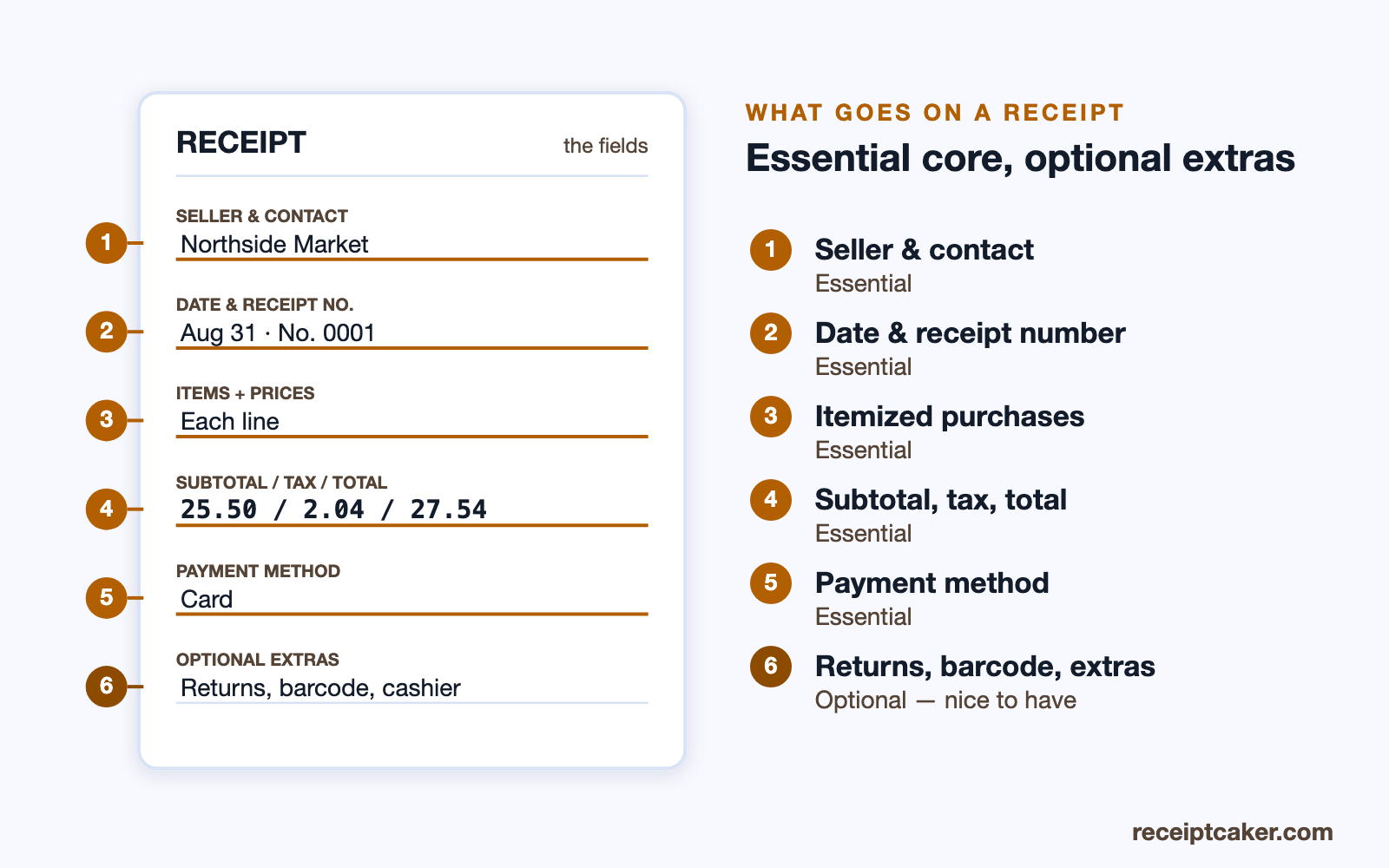
Essential fields versus optional extras
It helps to separate the fields a receipt must have from the ones that are merely useful. The essential core is a small, fixed set: who sold it and how to reach them, the date and a receipt number, the itemized purchases with prices, the subtotal, the tax line, the total, and the payment method. Leave any of these out and the document stops being a reliable record — a receipt with no date cannot anchor a warranty, one with no itemization cannot support a partial return.
Everything beyond that is optional polish. A returns policy printed at the foot, a barcode for the register, a loyalty note, a cashier's name, a thank-you line — each can be helpful in the right setting, but none is what makes the document a receipt. Knowing the difference lets you build a receipt that is complete without being cluttered, carrying every field that matters and none that just add noise.
Extra fields for businesses and tax
Some receipts need a little more depending on who issues them and why. A tax-registered business usually has to show its tax or registration number, and where tax is charged the receipt must break it out as its own labelled line so the buyer and the authorities can see it. For a business-to-business sale, an expense reimbursement, or anything the buyer will claim on tax, adding the buyer's name and details turns a generic slip into a record they can actually use.
These additions do not change the core set; they sit alongside it. The guiding test never changes: anyone reading the receipt later — the customer, an accountant, or a tax authority — should be able to tell who sold what, to whom, for how much, and when, without having to ask. If a field helps answer one of those questions, it belongs; if it does not, it is optional.
The figures have to reconcile
Having the money fields present is not quite enough — they also have to agree with each other. The subtotal must equal the sum of the line totals, the tax must be the subtotal times the rate, and the grand total must be the subtotal plus tax (minus any discount). When those three relationships hold, the receipt is internally consistent and trustworthy; when they do not, it invites exactly the dispute the receipt was meant to prevent.
This is where a generator quietly earns its place. Type the items and the rate and the subtotal, tax, and total are calculated from them, so they cannot drift out of step the way hand-keyed figures can. A discount, if there is one, belongs on its own line above the subtotal, so the arithmetic stays visible rather than hidden inside a changed price. A reader should be able to follow every number from the line items down to the total without a leap of faith. When they can, the receipt reads as trustworthy at a glance; when a figure does not add up, every other field on the document is suddenly in doubt too. In that sense the totals, though they are only arithmetic, do as much for a receipt's credibility as the seller's name at the top of it.